The best AI notetaker for Zoom depends on how you want the meeting captured.
Some tools are native to Zoom. Some send a visible participant into the call. Others capture system audio from your computer, so nothing new appears in the participant list. That choice affects consent, reliability, automation, and where the transcript lives after the meeting.
The short version:
- Choose Anarlog for bot-free Zoom notes with local SQLite storage, open-source code, and your choice of AI provider.
- Choose Zoom My Notes when your team already pays for Zoom Workplace and wants the most native workflow.
- Choose Granola for polished, collaborative notes built around the notes you jot during the call.
- Choose Tactiq for a live transcript inside Chrome without a meeting bot.
- Choose Fathom for a generous individual plan and sales follow-up workflows.
- Choose Otter for real-time collaboration and a searchable cloud meeting workspace.
- Choose Fireflies for broad integrations, multilingual workflows, and conversation intelligence.
Zoom AI notetakers compared
| Tool | Zoom capture path | Bot in participant list | Live transcript | Where the meeting record lives | Free or entry plan |
|---|---|---|---|---|---|
| Anarlog | Desktop system audio and microphone | No | Yes | Local SQLite by default | Free; Pro $15/month or $150/year |
| Zoom My Notes | Native Zoom client and desktop audio capture | No | Yes | Zoom Hub and Zoom Canvas | Limited Basic access; standalone from $8.33/month billed annually |
| Granola | Desktop system audio and microphone | No | Transcript runs in the background | Granola cloud workspace | Basic free; Business $14/user/month |
| Tactiq | Chrome extension or supported desktop capture | No | Yes | Tactiq cloud workspace; no audio recording | 10 transcripts/month free; Pro $8/user/month billed annually |
| Fathom | Visible assistant or bot-free beta on Mac | Optional | Yes | Fathom cloud workspace | Free for individuals; Premium $16/month billed annually |
| Otter | Visible Notetaker, desktop app, or browser capture | Optional | Yes | Otter cloud workspace | 300 minutes/month free |
| Fireflies | Visible assistant, Chrome extension, or desktop app | Optional | Yes | Fireflies cloud workspace | Free; Pro $10/seat/month billed annually |
The storage column matters after the call ends. If you are trying to locate Zoom's own records first, see how to find your Zoom meeting history.
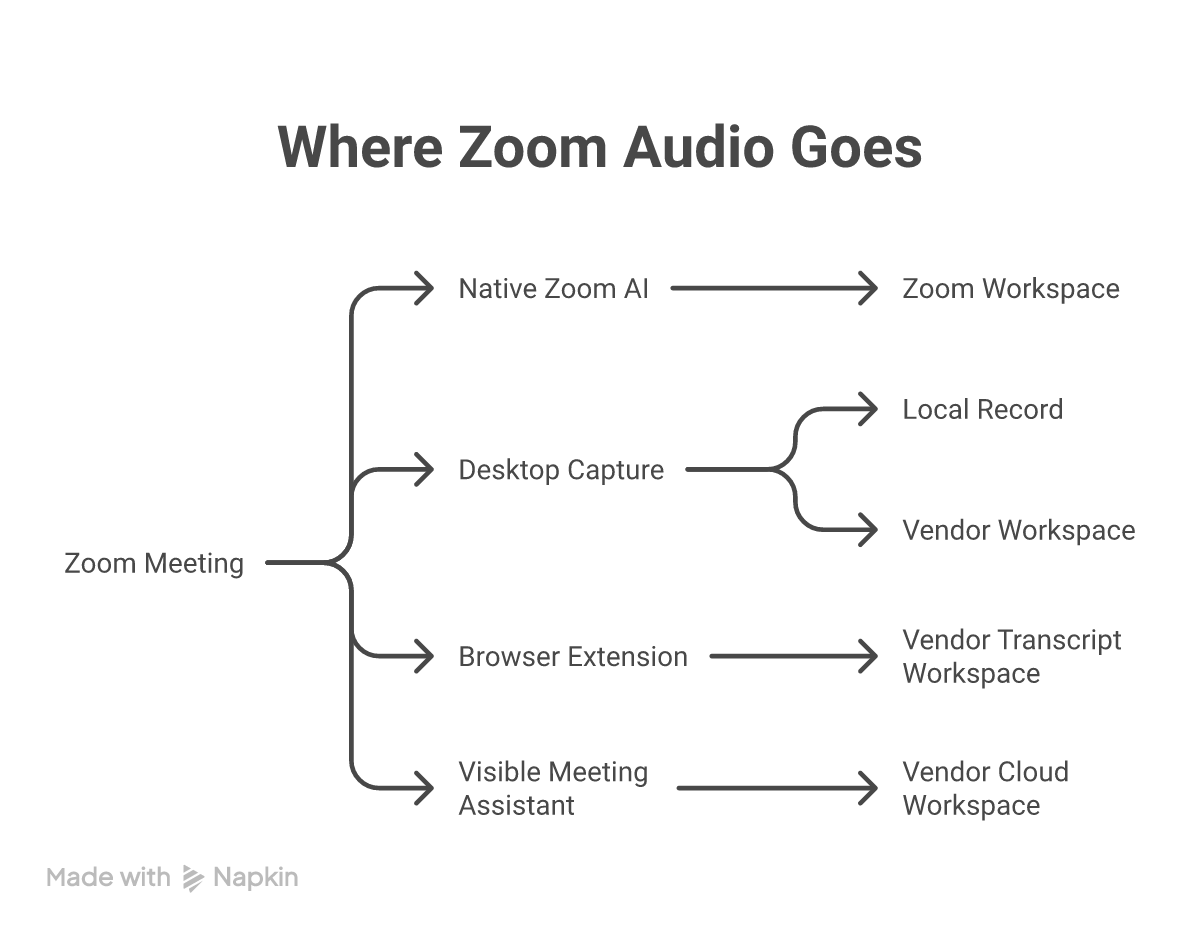
The capture method is the first filter. A visible meeting assistant is useful when you want automatic attendance and cloud workflow automation. Desktop capture is better when you want the call to remain visually unchanged or need the same tool across Zoom, Teams, phone calls, and in-person conversations.
How we evaluated the tools
We checked each vendor's current product, pricing, security, and help pages for this update. We did not rank tools by vendor accuracy percentages because those numbers rarely use the same audio, speakers, or scoring method.
Instead, we used five practical criteria:
- Capture behavior: native Zoom feature, visible participant, browser extension, or desktop system audio.
- Meeting output: live transcript, summary, action items, search, clips, and follow-up automation.
- Data model: local record or vendor-hosted workspace, plus the AI and sharing paths available.
- Workflow fit: personal notes, team memory, sales automation, multilingual meetings, or regulated work.
- Current limits: free-plan caps, paid entry point, platform restrictions, and admin controls.
No capture method removes your responsibility to tell people that transcription is active. Bot-free does not mean consent-free. Follow the law, company policy, and client expectations that apply to the meeting.
1. Anarlog: best for local ownership and AI-provider choice
Anarlog is an open-source AI meeting notetaker for macOS, Windows, and Linux. It records microphone and system audio from your computer, so it can capture Zoom without joining the call or requesting calendar access.
The canonical meeting record lives in local SQLite. Notes, transcripts, and meeting metadata are not dependent on a vendor-hosted workspace, and Markdown is available as an export when you need a portable copy.
What stands out
- Live transcription without a Zoom participant bot
- Local SQLite storage for the canonical meeting record
- On-device transcription, bring-your-own-key providers, or managed cloud AI
- Local models through Ollama or LM Studio
- Templates, transcript chat, search, imports, and portable exports
- MIT-licensed code that an IT team can inspect
What to consider
Windows and Linux builds are newer than the macOS app. Anarlog also does not try to be a sales-intelligence platform: it does not lead with call scoring, deal risk, or automatic CRM field updates.
The local-first model is not the same as claiming that data can never leave your computer. If you enable managed AI, CloudSync, sharing, or another provider, review that service path for the meeting you are recording.
Pricing
The Free plan supports local transcription, bring-your-own-key workflows, and the core meeting experience. Anarlog Pro is $15 per month or $150 per year and adds hosted transcription and AI, encrypted CloudSync, sharing, and calendar-connected services.
Choose Anarlog if: you want a Zoom notetaker that remains useful even if you change conferencing platforms, AI providers, or cloud vendors.
2. Zoom My Notes: best native option for Zoom Workplace teams
Zoom My Notes is now a broader product than the old Meeting Summary feature. It can transcribe in real time, combine the transcript with notes you type, generate a summary and action items, and trigger follow-up workflows.
For Zoom meetings, the main advantage is that it is native. There is no separate meeting assistant in the participant list, and hosts or participants can work from the Zoom client they already use. My Notes can also capture third-party meetings and in-person conversations from the desktop or mobile app.
What stands out
- Native Zoom experience with a visible transcription indicator
- Real-time transcription, manual notes, summaries, and action items
- Notes linked to the Zoom account, calendar, Hub, and Canvas
- Workflows for recap emails, team updates, and to-dos
- More than 30 languages for Meeting Summary and a smaller supported set for My Notes
- Zoom says customer communications content is not used to train Zoom or third-party AI models
What to consider
The result remains inside Zoom's cloud ecosystem. That is convenient if Zoom is already your system of record, but less attractive if you want a local archive or expect to change meeting platforms.
The old claim that Zoom AI Companion has no live transcription is no longer accurate. The current My Notes workflow can transcribe while the meeting is running. It also requires a current Zoom client for the full feature set.
Pricing
Zoom lists My Notes as included with paid Zoom Workplace plans and available as a standalone plan starting at $8.33 per user per month when billed annually. Zoom Basic has limited My Notes capacity. Check the current My Notes pricing because Workplace packaging can change.
Choose Zoom My Notes if: your team wants the fewest moving parts and is comfortable keeping its meeting memory in Zoom.
3. Granola: best for note-first collaboration
Granola is a desktop and mobile notepad that captures computer audio without inviting a bot. Its distinctive workflow starts with the notes you type. Granola uses the transcript to expand those notes into a cleaner record rather than treating the raw transcript as the main interface.
What stands out
- Bot-free capture across Zoom, Meet, Teams, and other meeting apps
- Notes shaped by what you marked as important during the call
- AI chat within and across meetings
- Shared folders and custom templates
- Business integrations with Slack, Notion, HubSpot, Attio, Affinity, Zapier, and MCP-compatible tools
- No audio or video recording retained in the standard transcription workflow
What to consider
Granola is still a hosted workspace. Its privacy policy allows some de-identified, aggregated product data to support model improvement, while users can opt out and Enterprise workspaces are opted out by default. The product is also not presented as a local or self-hosted meeting archive.
Pricing
Granola Basic is free with limited meeting history. Business is $14 per user per month for unlimited notes and history, advanced models, integrations, API access, and centralized billing. Enterprise is $35 per user per month.
Choose Granola if: you already take concise notes during Zoom calls and want AI to turn them into polished team memory.
4. Tactiq: best live Zoom transcript in Chrome
Tactiq is a Chrome extension for Zoom, Google Meet, and Microsoft Teams. It shows a live transcript without adding a participant to the meeting and then turns that transcript into summaries, action items, follow-up emails, and reusable AI workflows.
Tactiq does not record or store meeting audio. That makes it a lighter option than a video recorder, although the transcript and AI output still live in Tactiq's cloud service.
What stands out
- Live transcript during supported browser meetings
- No meeting bot and no stored audio recording
- More than 60 supported languages across its meeting platforms
- Reusable AI questions and Workflow Builder
- Integrations with tools such as Slack, Notion, Salesforce, HubSpot, Jira, and Linear
- Export and sharing without a separate desktop meeting workspace
What to consider
The browser workflow is the constraint. If your company standardizes on the Zoom desktop client, confirm the current Tactiq desktop support for your operating system before adopting it. Language availability also differs by meeting platform, and a user may need to switch the active language manually.
Pricing
Tactiq Free includes 10 transcripts and five AI credits per month. Pro is $8 per user per month billed annually for unlimited transcripts and 10 AI credits. Team is $16.67 per user per month billed annually with unlimited transcripts and AI credits.
Choose Tactiq if: you want to read the transcript during a browser-based Zoom call and do not need an audio or video archive.
5. Fathom: best individual plan for sales follow-up
Fathom combines recording, transcription, clips, summaries, search, and CRM-oriented follow-up. Its traditional workflow uses a visible assistant, but Fathom now lists a bot-free capture option in beta for Mac. Availability and recording behavior vary by capture mode, so test the exact Zoom setup you plan to use.
What stands out
- Unlimited recordings and transcriptions on the individual Free plan
- Instant summaries, searchable calls, and shareable clips
- Five advanced AI summaries per month on Free
- Paid action items, follow-up emails, and cross-call assistant
- HubSpot and Salesforce workflows on higher team plans
- Choice of bot or bot-free capture where the beta is available
What to consider
Fathom is strongest when the meeting output should feed a sales or customer workflow. It is less compelling if your priority is a local archive, a fully browser-based live transcript, or a mature bot-free path across every desktop platform.
Pricing
Fathom Free includes unlimited recordings and transcription for individuals. Premium is $16 per month billed annually. Team starts at $15 per user per month billed annually, and Business is $25 per user per month billed annually for deeper CRM and coaching features.
Choose Fathom if: you want a generous personal plan now and may add sales automation later.
6. Otter: best for real-time cloud collaboration
Otter remains one of the most established meeting workspaces. Its visible Notetaker can join scheduled Zoom meetings automatically, but Otter is no longer bot-only. Its Mac and Windows desktop apps can capture device audio without adding a participant, and browser and mobile recording cover other workflows.
What stands out
- Live transcript with speaker identification and collaborative editing
- Automatic calendar attendance through the visible Notetaker
- Bot-free desktop capture for Mac and Windows
- Search, AI Chat, action items, playback, and slide capture
- Salesforce, HubSpot, Slack, Asana, Google, and automation connections
- A mature cloud workspace for teams that want shared meeting history
What to consider
Otter stores the meeting record in its cloud workspace. Its privacy policy describes training proprietary AI on de-identified audio recordings and transcriptions. That may be acceptable for some organizations and disqualifying for others, so review the current policy instead of treating every cloud notetaker as equivalent.
Pricing
Otter Basic includes 300 transcription minutes per month, a 30-minute limit per conversation, three lifetime file imports, and the 25 most recent conversations in history. Paid plans raise those limits and add deeper export, integration, and administration features.
Choose Otter if: live collaboration and a searchable shared workspace matter more than local ownership.
7. Fireflies: best for integrations and multilingual workflows
Fireflies is a broad meeting automation platform. Its assistant can join Zoom as a visible participant, while its Chrome extension and desktop app provide bot-free capture paths for supported setups.
The product goes beyond notes into conversation intelligence, CRM updates, AI skills, assistants, and team analytics. That breadth is useful for a sales or recruiting operation and unnecessary for someone who only wants a clean personal summary.
What stands out
- Visible assistant, browser extension, and desktop capture options
- Unlimited transcription and AI summaries on the current Free plan
- More than 100 languages, with multi-language mode on higher tiers
- CRM, project-management, messaging, API, and automation integrations
- Topic, question, sentiment, and speaker analytics
- Fireflies states that customer meeting content is not used to train AI models
What to consider
Free storage is a cumulative team allowance rather than an unlimited archive. Advanced conversation intelligence, multi-language mode, admin controls, and private storage require higher plans. The product surface is also much larger than a focused note-taking app.
Pricing
Fireflies Free includes unlimited transcription and summaries, 400 minutes of storage per team, and 20 AI credits. Pro is $10 per seat per month billed annually. Business is $19 per seat per month billed annually.
Choose Fireflies if: meeting data needs to trigger many downstream workflows and language breadth matters.
Which capture method should you choose?
Use native Zoom notes when convenience wins
Choose Zoom My Notes when Zoom is already the approved workspace and the notes should stay connected to Zoom calendars, chats, and workflows.
Use desktop capture when participant visibility and ownership matter
Choose Anarlog when you want a local canonical record and AI-provider choice. Choose Granola when you want a hosted, collaborative note-first experience. Both avoid adding a participant to Zoom, but their storage models are fundamentally different.
Use a browser extension when you need the transcript now
Choose Tactiq when the Zoom call runs in Chrome and a live text transcript is more useful than a recording.
Use a cloud assistant when automation matters most
Choose Fathom, Otter, or Fireflies when automatic attendance, shared cloud history, clips, CRM updates, and team analytics outweigh the friction of another meeting service.
Questions to ask before buying a Zoom notetaker
- Will a visible assistant join the meeting, and can an admin control that behavior?
- Can participants see that transcription is active?
- Is audio or video retained, or only the transcript?
- Where are transcripts, summaries, and embeddings stored?
- Does the vendor use customer or de-identified data for model improvement?
- Can you export the complete meeting record in a useful format?
- What stops working when you leave Zoom or cancel the subscription?
- Does the free limit survive a normal week of meetings?
Frequently asked questions
Does Zoom have a built-in AI notetaker?
Yes. Zoom My Notes can transcribe Zoom and supported third-party meetings, combine the transcript with notes you type, generate a summary and action items, and run follow-up workflows. It is included with eligible paid Zoom Workplace plans and has limited availability on Basic.
Can an AI notetaker record Zoom without a bot?
Yes. Anarlog and Granola capture system audio from a desktop app. Tactiq transcribes supported Zoom meetings through Chrome and supported desktop capture. Zoom My Notes is native to the Zoom client. Fathom, Otter, and Fireflies also offer bot-free capture paths alongside their visible meeting assistants.
What is the best free AI notetaker for Zoom?
Use Anarlog when you want unlimited local transcription and can bring your own AI key or local model. Use Fathom for a generous cloud recording and transcription plan. Use Tactiq for up to 10 browser transcripts per month. Use Otter when 300 monthly minutes and 30-minute conversations fit your schedule.
Which Zoom notetaker is best for sensitive meetings?
There is no universal answer. Start with the approved data boundary. Anarlog can keep the canonical meeting record local and can use on-device transcription and local models. A cloud service may still be appropriate when your organization has reviewed its contract, retention, subprocessors, region, and admin controls. Confirm consent and every enabled AI, sync, and sharing path before recording sensitive material.
Which Zoom notetaker is best for sales teams?
Fathom and Fireflies are the clearest starting points when CRM updates, clips, follow-up emails, coaching, and conversation analytics matter. Otter is stronger when the team wants live transcript collaboration and searchable meeting history. Choose the workflow you will actually use, not the longest feature list.
The main decision is not which tool has the most AI features. It is who joins the meeting, where the record lives, and whether you can still use that record after your workflow changes.
If local ownership and AI-provider choice are the requirements, download Anarlog and test it on a normal Zoom call before moving a sensitive workflow.